
Reddit can be useful for research, discussion, and community support, but it also leaves a long trail of activity behind. If you want to delete Reddit history, the process is not always as simple as pressing one button. Your activity may include posts and comments, recent searches, viewed threads, saved items, local app data, and browser records. In 2026, the cleanest approach is still to delete your content step by step, clear local traces, and then close the account only after the rest is handled.
This guide explains how to delete your Reddit history in a practical way. It covers delete your reddit history methods for desktop and the Reddit app, how search history works, what happens when you delete your Reddit account, and why privacy-focused users often need more than basic deletion.
Delete Reddit History: What It Really Means
When people say they want to delete Reddit history, they usually mean more than one thing.
That history may include:
- Posts and comments
- Search history
- Browsing history
- Viewed threads
- Local cache on desktop or mobile
- Old account activity tied to a username
Reddit does not keep all activity in one single place. Some parts live in your reddit account, some remain in the reddit app, and some may stay in the browser or device cache. That is why a full cleanup takes more than one step.
If your goal is privacy, you need to delete reddit history across every place it may appear. That means removing posts and comments, clearing search history, checking local history, and reviewing account settings before account deletion.
Delete Your Reddit History Before You Delete Your Reddit Account
Many users make the same mistake: they delete the account first and think everything is gone. That is not how Reddit works.
Deleting your reddit account removes the profile, but it does not automatically delete every post or comment. Content that was already published can remain visible without the username attached. For that reason, the best order is:
- Delete posts and comments
- Clear search history
- Clear local history and cache
- Review privacy settings
- Delete the account last
This order matters because once the account is gone, it becomes harder to manage older activity. A careful cleanup gives you better privacy and fewer leftovers on the platform.
Delete Reddit Posts and Comments Manually
The most direct way to remove content is to delete posts and comments manually.
On Desktop
On desktop, the process is simple:
- Open reddit.com
- Sign in
- Go to your profile
- Open the Posts tab or Comments tab
- Find the item you want to remove
- Open the three-dot menu
- Choose Delete
You need to repeat this for every post or comment you want removed. This is the most reliable method because it uses Reddit’s built-in tools.
On the Reddit App
The reddit app also lets you delete content manually.
- Open the app
- Tap your profile icon
- Go to Posts or Comments
- Open the menu on the item
- Tap Delete
This works on both Android and iPhone. If you only have a few items to remove, manual deletion is fine. If you have years of activity, it can take a long time.
Why Manual Deletion Still Matters
Even in 2026, manual deletion is still the safest method for most users. It gives you direct control over each post or comment. You can check old posts, remove personal details, and decide what should stay.
This is important if you want to protect privacy, reduce public visibility, or remove content that no longer reflects you.
Delete Reddit Search History
Search history is separate from posts and comments, but you can clear reddit history to enhance privacy. You may delete every post you ever made and still see recent searches in the app or browser.
On Mobile
In the reddit app, tap the search bar. A list of recent searches appears. Tap the X beside each one to remove it.
This is useful if you want to clear recent searches from the device. It does not remove posts or comments.
On Desktop
On desktop, search history may appear in the search bar suggestions or in your browser history. You may need to remove it from both places.
To reduce the chance of it coming back, clear:
- Reddit recent searches
- Browser history
- Browser cache
- Saved autofill suggestions
This is one of the simplest ways to improve privacy fast.
Clear Local History on the Reddit App
The reddit app can store local viewing history. This is separate from your published content.
On some devices, you may see an option such as:
- History
- Clear history
- Clear local history
That option helps remove the device’s record of what you viewed. It does not remove posts and comments from Reddit itself.
If you use Reddit on more than one phone or tablet, repeat the cleanup on each device. Local history can remain on one device even after you clear it on another.
Delete Reddit History on Desktop and Browser
Desktop cleanup should include your browser, not only Reddit.
Your browser may store:
- Search terms
- Opened Reddit pages
- Cached images and page data
- Autofill entries
- Login cookies
To remove this local trail, clear browser history and cache. Search for Reddit in the history list and remove the related entries. If you stay logged in on a shared computer, also sign out and clear cookies.
This step helps reduce local traces of reddit browsing on your machine.
Privacy and Reddit Privacy Settings
If privacy is your main reason for cleanup, look beyond deletion. Reddit privacy settings can help limit what others see on your profile and what gets linked to your activity.
Review these areas:
- Profile visibility
- Account settings
- Connected apps
- Authorized third-party access
- Activity preferences
A careful account review helps reduce future exposure and allows you to remove reddit content effectively. It also makes it easier to keep your reddit account cleaner going forward.
What Happens to History on Reddit After Deletion
There is a difference between removing content from your profile and removing every copy of it from the internet.
When you delete a post or comment on Reddit, it is removed from your account and public profile. But copies may still exist in:
- Search engine cache can sometimes retain information even after you clear reddit history.
- Browser cache
- Archival tools
- Screenshots
- Third-party records
That is why people looking for a deeper cleanup often go beyond standard deletion. If privacy matters, you should assume that some traces can survive outside Reddit.
Delete Reddit History by Hand or Use a Bulk Tool
If you only have a few items, manual deletion works well. If you have hundreds or thousands of posts and comments, manual deletion can become a long cleanup project.
This is where bulk methods come in.
Some users use bulk delete tools to remove large numbers of posts and comments faster. These tools may help with:
- Mass deletion
- Bulk delete reddit history
- Delete comments
- Remove old posts
- Clear post and comment history
- Cleanup across many subreddits
A bulk tool can save time, but it should be used carefully. The most important thing is to make sure you understand what the tool does before connecting it to your account.
Why Some Users Need More Than Basic Deletion
A basic tutorial is enough for casual cleanup. It may not be enough for people dealing with reputation issues, old personal disclosures, or large amounts of public activity.
Some users want to delete posts and comments because:
- They shared personal details in the past
- They used Reddit for anonymous browsing but no longer want visible traces
- They are preparing for a job search or client-facing role
- They want a cleaner digital footprint
- They want to reduce old public exposure
In these cases, deleting Reddit history is not just about tidying up. It becomes part of a larger privacy plan.
Delete Your Reddit Account the Right Way
If your goal is to delete your Reddit history as completely as possible, account deletion should come after your content cleanup. Deleting your account removes your profile from Reddit, but it does not automatically erase every post or comment you made. That is why the order matters so much.
Before you delete the account, make sure you have already removed:
- Posts and comments
- Recent searches
- Local app history
- Browser cache and cookies
- Any visible personal details in older content
Once that is done, you can move to account deletion.
Delete Your Reddit Account on Desktop
On desktop, account deletion is usually found in account settings. The exact layout may change over time, but the process generally follows the same pattern.
- Sign in to your Reddit account
- Open Settings or Account Settings
- Look for the delete account option
- Confirm the password
- Finish the deletion steps
After this, the account starts the deletion process. This step closes your profile, but content that was not removed earlier may still remain on Reddit in a de-linked form.
Delete Your Reddit Account on the Reddit App
You can also delete your account from the reddit app.
On mobile, the steps usually look like this:
- Tap your profile icon
- Open Settings
- Find Account Settings
- Scroll to the delete option
- Confirm with your password
This is useful when you mainly use mobile and no longer want to keep the account active. Still, the same rule applies: delete content first, account second.
What Happens After Account Deletion
Once the account is deleted, your username is no longer usable. The profile stops working, and your old identity on the platform is removed from view.
That does not mean every post or comment vanishes from every place at the same time. Some content may remain in public threads, search results, or archived copies until those copies are also removed or expire.
For that reason, account deletion is the final step, not the first.
Delete Reddit Posts and Comments in Bulk
If your account has a long history, deleting content one item at a time may not be practical. Many users with active accounts look for bulk delete methods so they can remove large amounts of content faster.
Bulk methods are useful when you need to:
- Delete comments across many subreddits
- Remove old posts from years ago
- Clear large comment histories
- Speed up a privacy cleanup
- Cut down manual work
These methods may include browser tools, desktop tools, scripts, or services that connect to your account and remove content in batches.
Bulk Delete Reddit History Safely
Bulk deletion can help a lot, but it also requires caution. Any tool that can delete content at scale should be reviewed carefully before use.
A safe workflow usually looks like this:
- Export or save any content you want to keep
- Check which posts and comments should be removed
- Use a trusted bulk tool or script
- Run deletion in smaller batches
- Review the result
- Revoke access when finished
This keeps the process more controlled and reduces the chance of accidental removal.
Clear Reddit Browsing History
Browsing history is often forgotten during cleanup, yet it can still reveal what you viewed on Reddit.
Your reddit browsing history may include:
- Threads you opened
- Recent pages in the app
- Search result pages
- Old URLs saved in the browser
- Cached session data
To clear it, use both the app and your browser. On mobile, this can involve clearing local history. On desktop, you may need to clear browser records manually.
If you use Reddit on several devices, repeat the process everywhere. A cleanup on one device does not automatically affect the others.
Cache and Search Results Can Leave a Footprint
Even after deletion, some traces may remain in cache or search results for a while. Search engines, browser storage, and archive tools can keep old copies of pages or snippets.
That means you may still see:
- Old search results
- Cached page titles
- Snippets from deleted threads
- Archived comments
- URLs that still exist in search listings
This is one reason a full cleanup can take more effort than expected. Deleting content from Reddit is not always the same thing as removing every trace from the web.
What Stays Visible After You Delete Content
When content is deleted, people may still see that something once existed, even if the text is gone. A thread may remain with a removed or deleted marker. A comment chain may still show gaps. A direct link may still exist.
That is normal behavior for many platforms, not only Reddit.
If you want to reduce the chance of old personal details staying visible, it helps to edit a post or comment before deleting it. Some users replace the text with a short neutral line, then remove it. That does not erase every copy, but it can reduce what remains in the original thread.
Desktop vs Mobile Cleanup
Desktop and mobile cleanup are similar in goal, but they differ in how you reach the tools.
Desktop is better for:
- Reviewing large numbers of posts
- Managing browser history
- Clearing cache and cookies
- Handling multiple tabs and tools
- Using bulk deletion tools
Mobile is better for:
- Quick search cleanup
- Clearing local app history
- Removing a few recent posts or comments
- Deleting the account on the go
If you are doing a deep cleanup, desktop is usually easier. If you only need basic privacy maintenance, the app may be enough.
Old Posts Need Special Attention
Old posts are often the ones users forget about. These can include:
- Early account activity
- Personal stories
- Questions tied to real identity
- Work-related comments
- Location clues
- Repeated usernames across platforms
Because old posts may be easier to find than you think, it is worth reviewing your earliest activity carefully. A full cleanup should cover your oldest content, not only the most recent week or month.
What to Remove First
A good order for cleanup is:
- Posts with personal information
- Comments that reveal identity
- Search history
- Viewed threads
- Cached browser data
- Account data
This order gives priority to content that creates the biggest privacy risk.
Reduce Your Digital Footprint Across Platforms
Reddit is only one part of your online presence. A deleted Reddit account can still leave clues if the same username appears elsewhere.
Many users also check:
- Social profiles
- Forum accounts
- Old linked bios
- Public usernames
- Search engine results
That wider cleanup helps reduce your footprint across platforms. It can make your Reddit deletion efforts more effective because fewer links remain between accounts.
What Survives After You Delete Reddit History?
One of the most common questions users ask is whether deleted Reddit content disappears forever. The answer depends on where the content exists.
When you delete a post or comment from Reddit, it is removed from public view on the platform. Yet there may still be copies outside Reddit’s direct control.
These can include:
- Search engine cache
- Browser cache
- Screenshots
- Archived pages
- Third-party services
- Shared links on other websites
This does not mean deletion is pointless. It simply means that deleting content from Reddit and removing every trace from the internet are two different goals.
Understanding Archives and Historical Copies
Over the years, various services have collected Reddit data for research and archival purposes. Some users are surprised to find old discussions appearing outside Reddit itself.
Historical databases and archive projects may contain:
- Comment history
- Post history
- Public discussion threads
- Metadata associated with public content
In some cases, archived copies may remain accessible even after the original content has been removed.
This is why users concerned about privacy should act quickly when they discover unwanted content.
Pushshift and Archived Reddit Data
One name frequently mentioned in discussions about archived Reddit content is Pushshift.
Pushshift was widely used to index public Reddit activity and make it searchable. While access and functionality have changed over time, many users still associate archived Reddit content with Pushshift data.
If your goal is complete privacy, remember that deleting content today cannot always guarantee removal from historical databases that captured public information in the past.
Why Reddit Browsing History Matters
Many users focus only on published content and forget about reddit browsing activity.
Your reddit browsing history may reveal:
- Interests
- Communities visited
- Research topics
- Personal concerns
- Frequently viewed threads
Clearing your reddit browsing history helps reduce local traces of your activity.
This is especially important if:
- You share devices with family members
- You use public computers
- You access Reddit from work devices
- You value personal privacy
A simple cleanup of browsing data can remove a surprising amount of information.
Reddit Privacy Best Practices
Deleting content is only one part of reddit privacy.
Good privacy habits include:
Use Strong Privacy Settings
Review your reddit privacy settings regularly and disable features you do not need.
Audit Connected Apps
Check which third-party tools have access to your account and remove any that are no longer necessary.
Review Public Activity
Look through your reddit activity every few months and remove anything that no longer belongs online.
Avoid Sharing Personal Information
Many users accidentally reveal:
- Real names
- Locations
- Employers
- Contact details
- Personal stories
Even small details can make an account easier to identify.
Separate Personal and Professional Accounts
Using different accounts for different purposes can help maintain better reddit account privacy.
Clearing Your Reddit History: Recommended Checklist
If you want a complete cleanup, use this checklist.
Account Content
✓ Delete reddit posts and comments
✓ Remove old posts
✓ Delete comments containing personal details
✓ Review your post and comment history
Search Activity
✓ Clear reddit search history
✓ Remove recent searches
✓ Clear browser search records
Device Cleanup
✓ Clear local history
✓ Remove app cache
✓ Remove browser cache
✓ Delete stored cookies
Privacy Review
✓ Review account settings
✓ Update privacy settings
✓ Remove unused app permissions
✓ Check reddit privacy settings
Final Account Action
✓ Proceed with deleting your account
Following these steps gives you the most complete cleanup available through normal user controls.
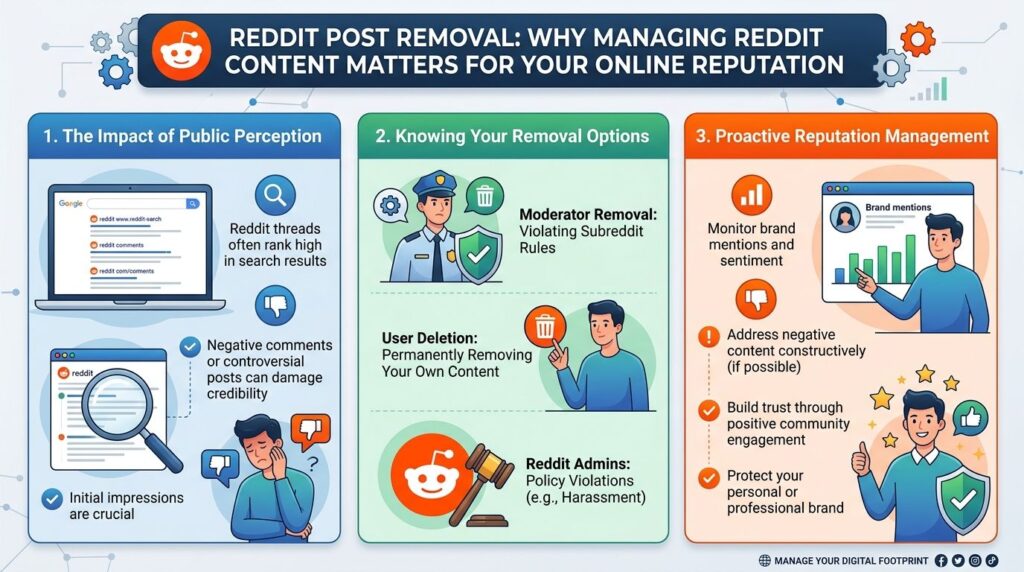
When to Consider a Professional Reddit Post Removal Service
Deleting content that you personally posted is usually straightforward. Reddit provides built-in tools to remove your own posts, comments, and account activity. The challenge begins when harmful content was posted by someone else, moderators are unresponsive, or the content continues damaging your reputation long after it was published.
In these situations, a professional Reddit post removal service may be worth considering. These services assist with issues such as defamatory content, false accusations, privacy violations, doxxing, copyright infringement, impersonation, and other posts that may violate Reddit’s policies or applicable laws. They can also help when content appears across multiple subreddits, has been widely shared, or requires coordinated outreach to moderators and platform administrators.
Professional removal specialists typically use a combination of moderator communication, policy-based reporting, DMCA takedown requests, legal documentation, and reputation management strategies. While no company can guarantee the removal of lawful content that complies with Reddit’s rules, experienced specialists can often improve the chances of a successful outcome in complex cases. If a Reddit post is causing serious personal, professional, or business harm, working with a dedicated Reddit post removal service can save time and provide guidance through a process that many users find difficult to handle on their own.
Common Questions About Reddit History
Can I Delete My Entire Reddit History At Once?
Reddit does not currently provide a one-click option to delete your entire Reddit history. Users typically remove content individually or use approved third-party tools for larger cleanups.
Does Deleting My Account Remove Everything?
No. Deleting your account removes the profile but does not automatically remove all posts and comments that were previously published.
Can I Remove Search History?
Yes. Search history and recent searches can be cleared through the Reddit app and browser tools.
What Is the Fastest Way to Delete Thousands of Posts?
For users with thousands of posts, bulk delete methods may save significant time compared to removing content one item at a time.
Can Deleted Content Still Appear In Search Results?
Sometimes. Search engines may continue showing cached versions until they update their indexes.
Final Thoughts
Learning how to delete Reddit history is really about understanding where your information exists. Posts and comments, search history, local app data, cache files, and archived copies all play a role in your online footprint.